Your NDIS admin.Automated for you.

We build AI automations for onboarding, reporting and repetitive admin, inside the tools you already use.

Here’s how I put AI to work

See what you could automate.

Three workflows Seb already uses at Support Mates.

Built around the tools you use.

  • ShiftCare
  • Xero
  • Notion
  • Dropbox
  • Slack
  • Typeform
  • Dropbox Sign

Connections Seb uses at Support Mates. Your setup is checked before the scope is agreed.

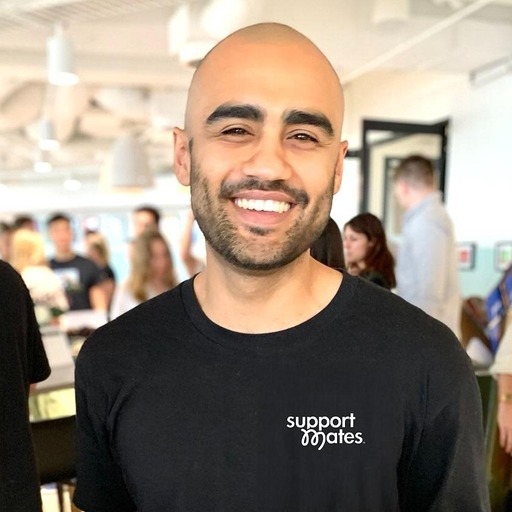
Seb, CEO of Support Mates and creator of Checksout
SebNDIS provider · Creator of Checksout

Built by someone
doing the work.

Seb runs Support Mates, a registered NDIS provider on the Gold Coast. These are the automations his own team uses.

“An agency quoted us $15,000, then a monthly fee. I built our own instead.”

He started with onboarding, then built the Monday briefing and regulatory scan. Now he sets up practical automations with you and shows your team how to use them.

Your first automation, built for your business.

  1. Agree the scopeOne process, the tools it touches and who checks the result, agreed in writing.
  2. Build and testSeb builds it in your accounts and runs real examples through it with you.
  3. Team handoverA walkthrough, written instructions and two weeks of help as your team starts using it.

One business process, automated

From $2,997 one-off · scoped before you commit

A build for one process, such as participant onboarding or a weekly briefing, agreed around the tools you use.

Talk to Seb about a task

Seb takes on a small number of builds alongside running Support Mates.

What you receive

  • A plan for the task you want to automateWork through it with Seb and receive a step-by-step map of what happens, which tools connect and where someone checks the result.
  • The automation, set up in your accountsSeb connects the agreed tools and steps, with human checks where needed. The build lives in accounts you own.
  • Testing before your team relies on itSeb runs real examples through the process and checks the results with you. A person reviews every record the automation creates before your business relies on it.
  • A walkthrough for your teamSee how to use it, what to check and what to do if something needs attention.
  • Instructions you can refer back toA written guide covering how it works, account access, running costs and who looks after it.
  • Two weeks of help after handoverSeb answers questions and fixes issues with the agreed build as your team starts using it.

Scope, tool access and running costs agreed in writing before building. Larger projects and further builds quoted separately.

What would you stop doing manually?

Pick a starting point and tell Seb a little about it. He reads these himself and replies by email.

Thanks, Seb has it. He’ll reply by email.
What would you like help with? (optional)

No obligation, no automated sales sequence. Your details go to Seb, not to a sales list.

Questions providers ask about this.

Do we need Notion or the audit workspace?

No. This service is built around your existing tools. The audit workspace is a separate, ready-made home for policies, registers and evidence. Seb will discuss suitable tools with you before agreeing the scope.

Will it work with ShiftCare?

Seb connects to ShiftCare at Support Mates today. What can be automated depends on what each tool allows at the time, and some tools let AI read more than they let it write. You hear that before the scope is agreed, not after.

What subscriptions might we need?

Most workflows run on tools you already pay for. Some need a paid plan on one of them, or an automation service costing a few dollars a month. Your own software and automation subscriptions are separate from the build. Any paid plans and expected running costs are listed before you commit. There is no subscription to Checksout for this service.

Can you promise how much time we’ll save?

No, and be wary of anyone who does. How much it saves depends on your volume and how your team uses it. What Seb can say with confidence: set up properly, the automation takes the repetitive part of that process off your team every time it runs. Nobody is retyping, chasing or checking that by hand any more. That is the whole point of picking the process first, and Seb can show you what it changed at Support Mates.

Is this custom software?

No. The work connects tools you already own and sets up AI to run between them. Nothing is built from scratch, and no one will promise to connect every platform.

We’re not confident with technology. Is this for us?

That’s the point. Your team keeps doing their jobs in the tools they know. Seb handles the connections, then shows you what changed and how to use it.

Which tools can see our information?

Your source records stay in accounts you own. Before building, you agree in writing which tools may read or process information at each step. Each step uses only the information it needs; the handover records access and who maintains what. Your privacy obligations remain yours. Ask your adviser if you’re unsure about a proposed setup.

Will AI tools train on our information?

Seb sets up business plans whose vendors’ terms say customer content isn’t used to train their models, and checks the settings with you. That is the vendor’s promise, not Checksout’s guarantee. You receive the relevant settings and terms in writing.

What happens after handover?

You receive written instructions, team training and two weeks of follow-up for fixes and questions. Access is removed or handed over as agreed. Further work is quoted separately, with responsibility for maintenance documented.
Talk to Seb about a task